What can an AI lawn care app actually do?
Most lawn advice fails at the first step: knowing what you're looking at. Homeowners treat fungus for grub damage, water lawns that are dormant rather than dead, and buy broadleaf herbicide for a sedge it can't kill — then conclude that lawn care is a black art. An AI lawn care app earns its place by fixing exactly that step: it identifies the grass, the weed, or the problem from a photo before any money is spent, then times the fix to your grass type and your local weather instead of a printed calendar. This page explains what that looks like in practice, where AI genuinely helps, where it still needs your judgment — and how to judge any lawn app that claims AI, including this one.
What an AI lawn care app actually does
Strip away the marketing and an AI lawn app is a loop with three stages:
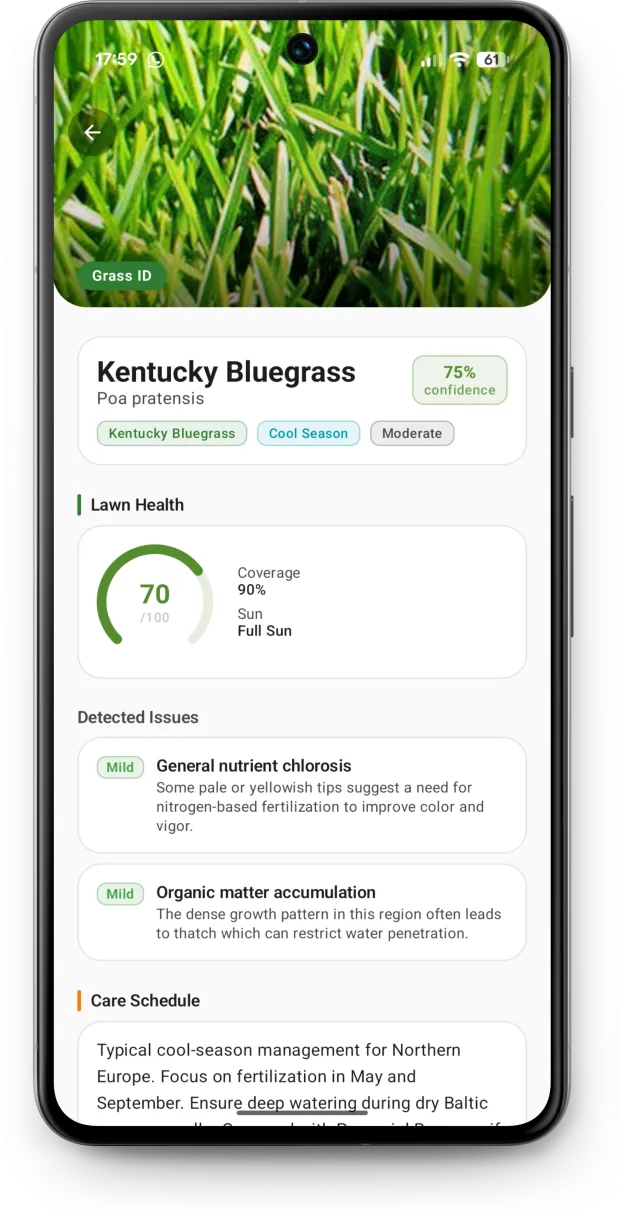
- Identify. A photo becomes a diagnosis: your grass species, the weed's name and family, the disease or pest behind a brown patch, or the numbers on a soil test report.
- Plan. The diagnosis changes the plan. Kentucky Bluegrass and Bermuda want different mowing heights, feeding windows, and watering depths — so the schedule is generated from what the scan found, your region, and your soil, not from a generic template.
- Time. The plan reacts to weather. Rain covers this week's watering; a heat wave pauses tasks that stress the lawn; the fall seeding window opens on your local frost dates, not a national average.
Each stage is only as useful as the one before it. An app that identifies but doesn't plan leaves you googling what to do with the name; an app that schedules without identifying is a paper calendar with notifications. The loop is the product.
The five scans, and what each one tells you
| Scan | You photograph | You get back |
|---|---|---|
| Grass identifier | A patch of your lawn, close enough to see blades | Grass species, health score, coverage assessment, and care tuned to that species |
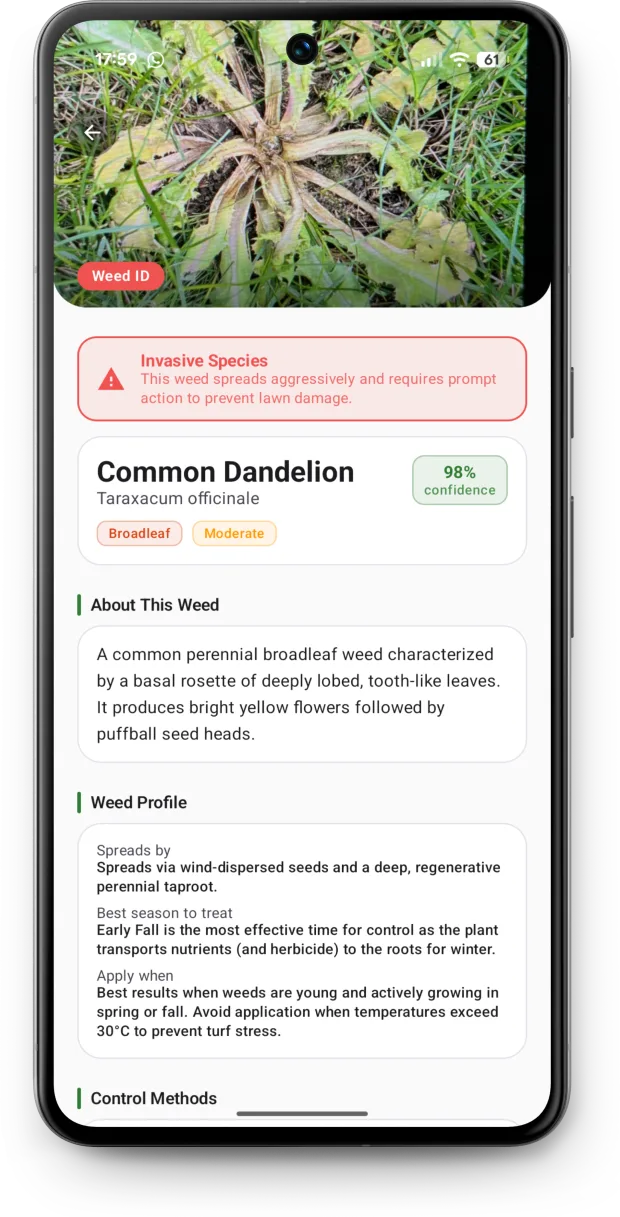
| Weed identifier | The intruder, leaves and flower if it has one | Species and family (broadleaf, grassy, or sedge) — which decides what will actually kill it — plus control options |
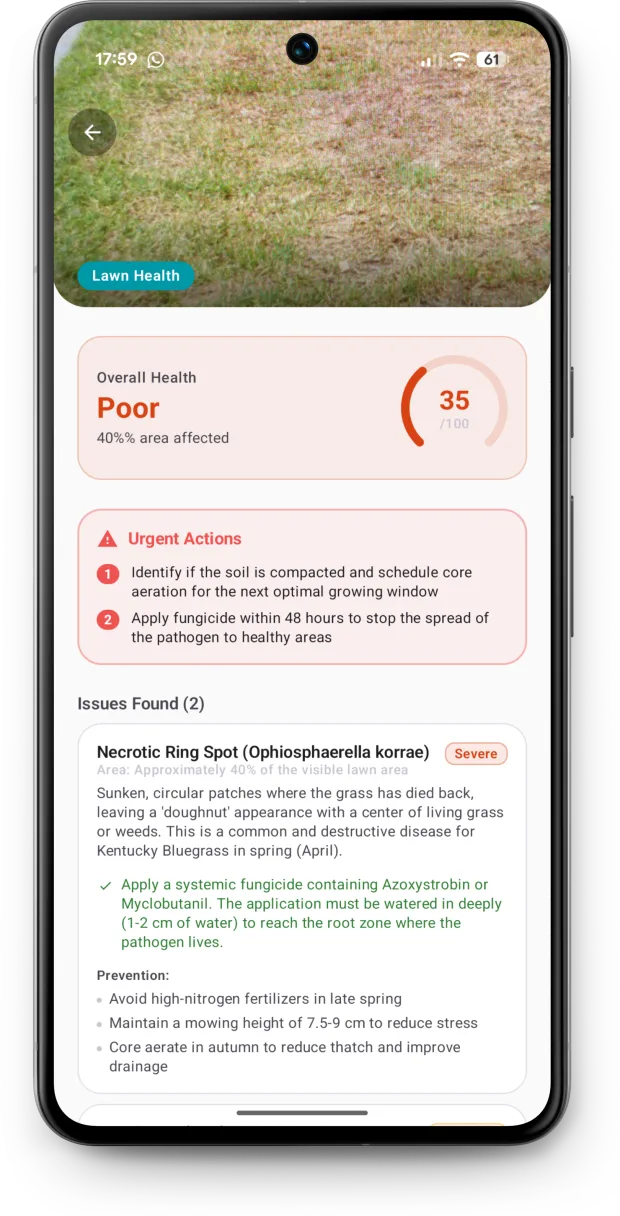
| Lawn Doctor | The sick area, including the edge where damage meets healthy grass | Likely disease, pest, deficiency, or stress with a severity rating, treatment plan, and prevention tips |
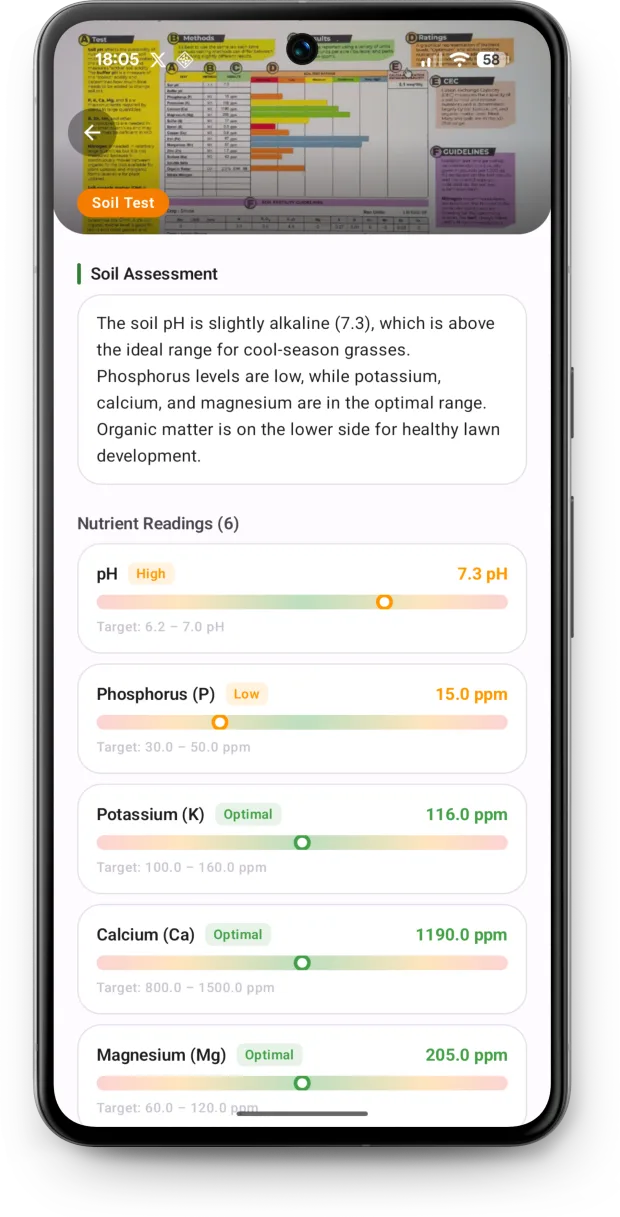
| Soil test reader | Your soil test kit results or lab report | pH and nutrient levels extracted, plus the amendments, rates, and timing to correct them |
| Lawn Assistant | Anything — or just type a question | Specific advice that knows your grass type, region, and scan history |
The scans feed each other. A grass ID sets the mowing and feeding baseline; a soil test bends fertilizer choices toward what your soil is actually missing; a Lawn Doctor diagnosis inserts a treatment into the schedule at the right point. If you only ever run one, run the grass identifier — almost every other decision depends on it.
See what a scan returns
How to take a photo the AI can actually use
The single biggest factor in scan quality isn't the model — it's the photo. Five habits make the difference:
- Shoot in daylight, without flash. Flash flattens the leaf texture and shifts color; overcast daylight is ideal because it shows true green without harsh shadows.
- Get close enough to see individual blades. For grass ID, fill the frame from about knee height so blade width, tip shape, and color are visible. A lawn photographed from standing height is mostly a green blur.
- Include the boundary. For brown patches and diseases, frame the edge where damage meets healthy grass — the transition pattern carries more diagnostic information than the dead center.
- Photograph the whole weed. Leaves, stem, and flower or seedhead if present. The stem alone separates a sedge from a grass, and the flower separates look-alikes like clover and woodsorrel.
- For tricky grass, add an unmowed sample. Mowing removes the traits that separate similar species. A corner left to grow for a week — or a blade from along the fence line — gives the AI the seedhead and natural growth habit back.
What the AI reads in your photo
The model looks at the same traits a turf agronomist checks by hand: blade width and texture, leaf tip shape (Kentucky Bluegrass's boat-shaped tip is the classic), how the leaf is folded or rolled in the bud, color and sheen, growth habit — bunching versus creeping — and, for problems, the shape, color banding, and distribution of damage across the lawn. Scattered saucer-sized tan spots point one way; an expanding irregular blotch in shade points another; sharply defined green-ringed spots near the patio door point to the dog.
The difference from a field guide is that the app checks all of these traits at once and weighs them against each other, which is exactly the step people struggle with — most misidentifications come from matching one trait and stopping there.
What AI gets right — and where it still needs you
An honest accuracy picture, because "AI-powered" on an app store page tells you nothing:
- Reliably strong: separating visually distinct species (tall fescue vs. Bermuda, dandelion vs. clover, nutsedge vs. any true grass), spotting the classic disease signatures, reading printed soil reports, and catching the problems people misdiagnose most — grubs vs. fungus vs. drought.
- Good with the right photo: closely related cool-season grasses after mowing, early-stage disease before the pattern develops, and mixed lawns where several species share the frame. This is where the photo habits above pay off.
- Where you stay in the loop: the app reports severity and reasoning, not just a name — read it. And for high-cost decisions (killing a lawn to re-seed, treating a large area with fungicide), a confirmation from your county extension office is cheap insurance. The app is designed to make that conversation better, not replace it: you arrive knowing your grass type and holding a specific suspected diagnosis.
The AI shows its work
Every identification lists the visible traits it was based on, and every diagnosis includes a severity rating and reasoning. If the traits listed don't match what you see on the ground, re-scan with a better photo — that feedback loop is the practical difference between a tool and a party trick.
Try it on your own lawn
The fastest way to judge an AI lawn app is to point it at the lawn you know best. Download Lawn Care AI free, scan a patch of grass, and see whether the species, health score, and reasoning match what's actually growing out there.
From one scan to a year-round schedule
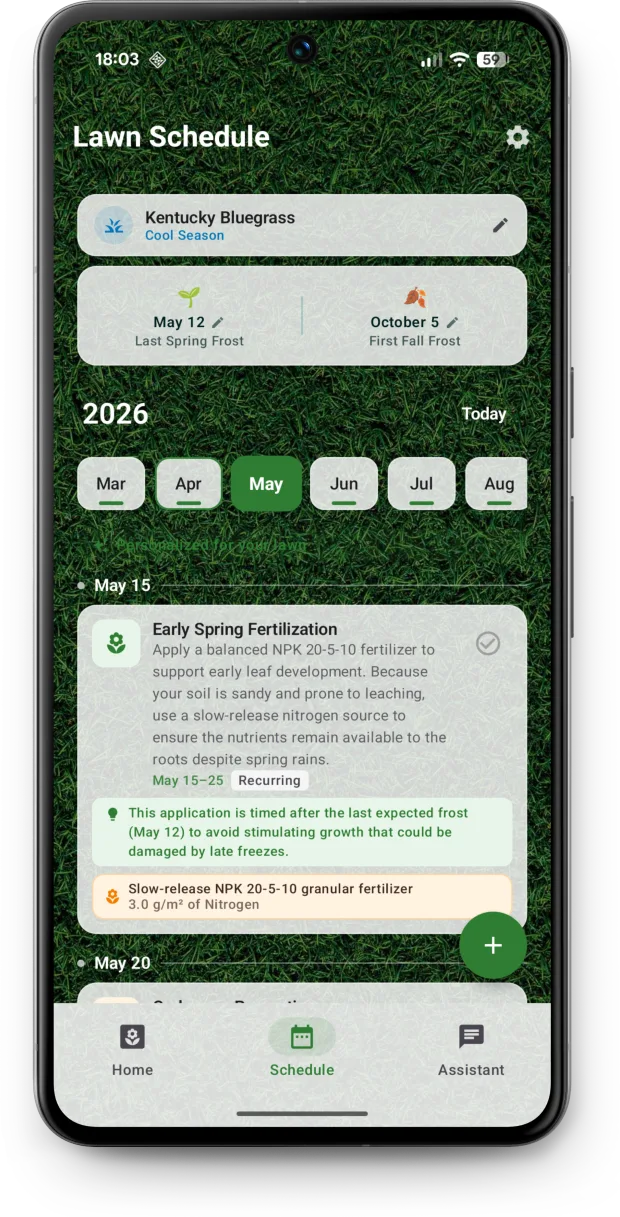
Identification is the entry point; the schedule is where the value compounds. Once the app knows your grass type, region, and soil, it generates a month-by-month plan: when to fertilize and at what rate, when to apply pre-emergent (timed to soil temperature, not the calendar), when the overseeding window opens and closes for your species, mowing height changes through the season, aeration, dethatching, and winterization. Every task carries a "why now?" explanation, so the schedule teaches while it reminds.
Then the weather layer keeps it honest. The app tracks rainfall and evapotranspiration for your exact location: if the sky delivered this week's inch (25 mm) of water, it doesn't tell you to water anyway — and tasks that shouldn't happen on wet or heat-stressed grass go on hold until conditions are right. You can log your own light, medium, or deep waterings — from the app or a home-screen widget — and the app nets them against your lawn's actual water deficit. That's the difference between a schedule and watering guidance that reacts to the week you're actually having.
Is the AI lawn care app free? What's free and what's premium
The app is free to download, and free AI lawn scans are included — grass identification, weed ID, and Lawn Doctor diagnosis all work without paying. The premium plan unlocks the fully personalized year-round schedule, weather-aware reminders, and soil-test-tuned care. That split is deliberate: you can verify the AI does what this page claims on your own lawn before a subscription enters the conversation.
How an AI app compares to other lawn tools
| Tool | What it does well | What it leaves out |
|---|---|---|
| AI lawn care app (Lawn Care AI) | Photo diagnosis of grass, weeds, diseases, and soil reports; a schedule generated from the scan; weather-reactive watering | It advises — spreading, spraying, and mowing are still yours |
| Brand apps (e.g. My Lawn by Scotts) | Free, simple seasonal schedules and spreader settings | Built around one brand's product line; no photo diagnosis |
| Enthusiast programs (e.g. Yard Mastery) | Detailed plans built from a mail-in soil test; strong community | Plan arrives after the kit purchase and ships with a product ecosystem; no instant photo ID |
| Plant-ID apps (e.g. PictureThis) | Excellent at naming individual plants, including many weeds | Built for gardens and houseplants — no turf schedules, mowing heights, or lawn disease focus |
| Lawn subscription services (e.g. Sunday) | Custom plan with products shipped to your door | The plan exists to sell the box; you pay for products whether or not you needed them all |
| Lawn care service | Someone else does the work | Costs hundreds to thousands per year, and you rarely learn why anything is done |
These aren't all competitors — plenty of people run an AI app alongside a service, using the scans to check that the service is treating the right problem. The honest positioning: an AI lawn app is for people who do their own lawn work and want the diagnosis and timing handled.
How to judge any AI lawn app: a 6-point checklist
Search the app stores for "AI lawn care" and you'll find a crowd of similarly named apps. Instead of trusting names, test any candidate — including ours — against six questions:
- Does a photo produce a specific answer? A species name with visible-trait reasoning, not "this appears to be grass."
- Does the scan change anything? If the app's advice is identical before and after it learns your grass type, the AI is decoration.
- Is watering advice weather-aware? "Water 1 inch per week" is a poster. "Rain covered it, skip this week" is a tool.
- Can it read a soil test? Fertilizer advice that ignores your soil is guessing with confidence — the numbers matter.
- Is product advice brand-neutral? Recommendations by active ingredient and application rate, not by one company's catalog.
- Can you try the AI before paying? Free scans before any subscription talk. If the paywall arrives before the first result, the result probably isn't the product.
A free lawn care app for iPhone, iPad, and Android
Lawn Care AI runs on iPhone and iPad (iOS 16.6 or later) and on Android phones and tablets via Google Play, in 33 languages. Scans use ordinary phone camera photos — no clip-on lenses, meters, or hardware. Every scan is saved to history, so you can compare this month's lawn against last month's and actually see whether the plan is working.
AI lawn care FAQ
Is there an app that does lawn care with AI?
Yes. Lawn Care AI uses AI to identify your grass type, weeds, and lawn diseases from a photo, then builds a year-round care schedule around the results. It is free to download on iPhone, iPad, and Android, and free AI lawn scans are included.
What is the best AI lawn care app?
The one that goes beyond naming plants. Judge any AI lawn app on four things: whether a photo produces a specific diagnosis with reasoning, whether that scan actually changes your care plan, whether watering advice follows live local weather, and whether it can read a soil test. Lawn Care AI was built to do all four in one app.
Can AI really identify grass type from a photo?
Yes, with good input. Visually distinct species — tall fescue next to Bermuda — are reliable from one clear daylight photo. Closely related cool-season grasses can look near-identical after mowing, so the app pairs its answer with the visible traits it used, and a second photo of a taller, unmowed corner sharpens the result.
How accurate is AI lawn disease diagnosis?
Strong on the common, visually distinct problems — grub damage, dollar spot, dog urine spots, drought stress — and every diagnosis comes with a severity rating and the reasoning behind it. Look-alike symptoms are exactly where a photo diagnosis helps most, but for expensive decisions like a full renovation, confirming with a local extension service is still smart.
Is the Lawn Care AI app free?
The app is free to download and includes free AI lawn scans. A premium plan unlocks the fully personalized year-round schedule, weather-aware reminders, and soil-test-tuned care.
Does the app work on iPhone and Android?
Yes. It runs on iPhone and iPad with iOS 16.6 or later, and on Android phones and tablets through Google Play, in 33 languages. Scans use normal phone camera photos — no extra hardware needed.
Is there a free AI grass identifier app?
Yes. Lawn Care AI works as an AI grass identifier: photograph the lawn and the app names the species from the traits it can see — leaf width, vernation, ligule, growth habit — and explains which ones it used. The app is free to download and free AI scans are included, so you can check what you have before a subscription enters the conversation.
One photo answers the question you've been guessing at
Download Lawn Care AI free, scan your lawn, and get an identification, a health score, and a plan built for your grass — not the average of everyone else's.